Gallery for Nextcloud on Android

Your photos.
Your storage.
Fully private.

Next Gallery is an Android gallery for Nextcloud: it seamlessly integrates your Nextcloud. Stop worrying about where your pictures are: on your phone or in the cloud – you simply work with them as usual in your photo gallery.

Get it on Google Play
No trackersNo adsNo subscriptionNo account with us
What it does

Cloud photos that feel like the ones on your phone – on Android? Impossible?

Then give Next Gallery a try. Whether Nextcloud, OneDrive, Google Drive or S3, your cloud becomes part of your gallery – not another app you have to look after.

Privacy

Fully private – no small print.

Next Gallery is a gallery, not a service. Nobody stands between your phone and your cloud – not even us.

No server of our own

Next Gallery runs no backend. Your photos go straight from your phone to the cloud you connect – never through us.

No trackers

No analytics, no crash reporting, no ad networks. Nobody learns what you do in the app.

No ads, no account

No account with us, no sign-up, no ads – not in the free version either.

Only when you write

The only contact with us is a support email – and you send it yourself, from your own mail app.

The same goes for this website: no cookies, no trackers, no external fonts.

Nextcloud, built in

Connect once. The gallery does the rest.

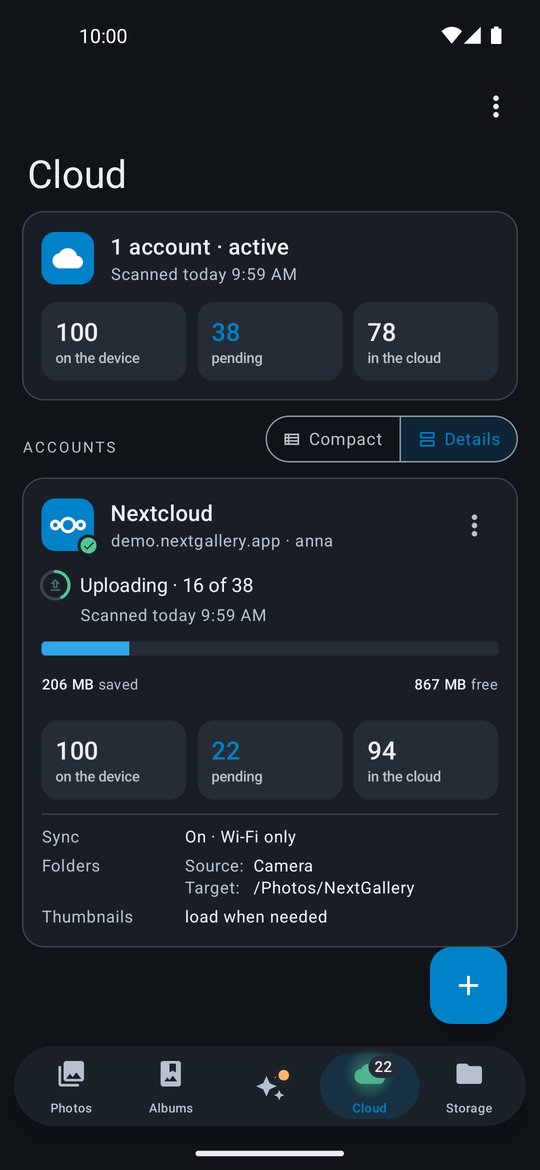
Sign in, pick the folders on your phone, choose a target folder in the cloud – done. New photos are uploaded to your Nextcloud automatically, and your cloud photos show up right in the gallery – with thumbnails from your own server; the original only loads when you open it.

  • At a glance: how much is on the phone, what is still open, what is already in the cloud
  • Wi-Fi only, with or without videos – you decide per account
  • The app never sees your password: you sign in to Nextcloud and OneDrive in the browser, and the app only gets a key you can revoke at any time. Google Drive you allow through Google Play services; the app never gets your Google password. Only for S3 do you enter access keys yourself – all of it encrypted on the device.
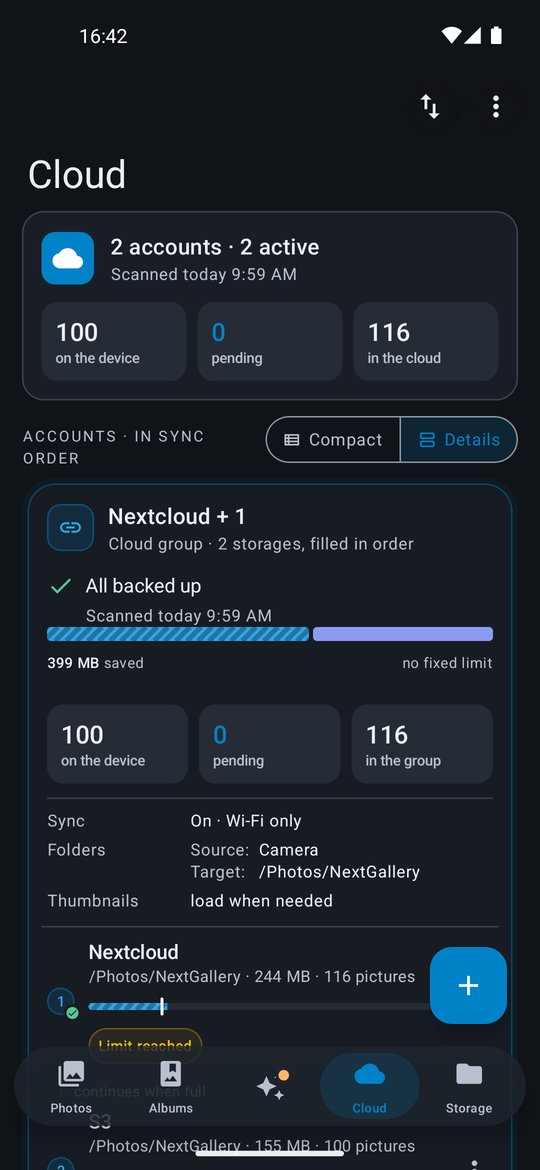
Cloud page with a connected Nextcloud account: local, open and in the cloud side by side
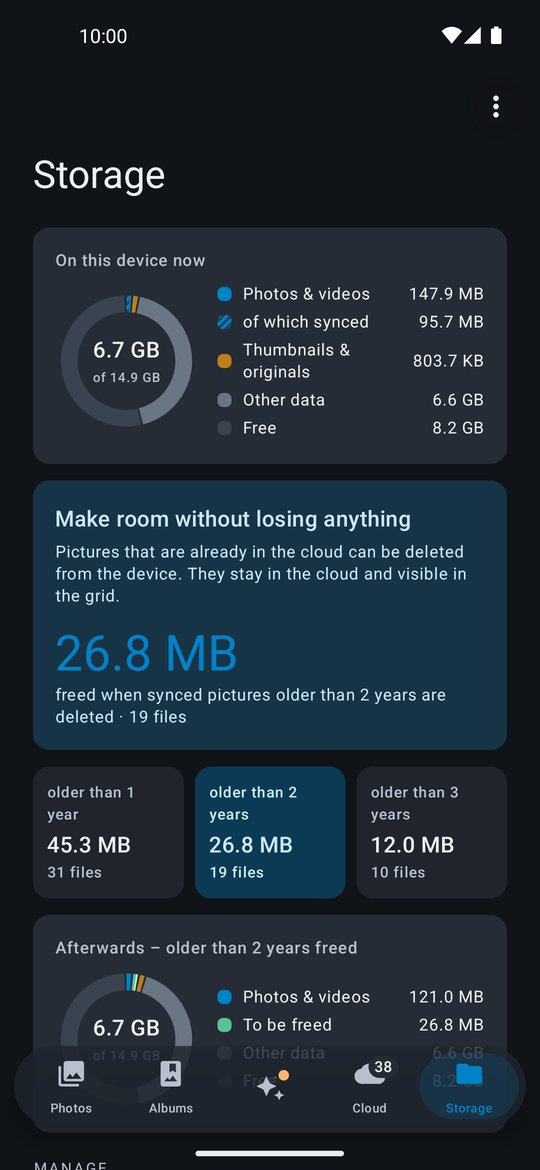
Free up space

Make room on your phone – without losing a thing.

Never again wonder whether you can really delete photos from your phone when space runs low.

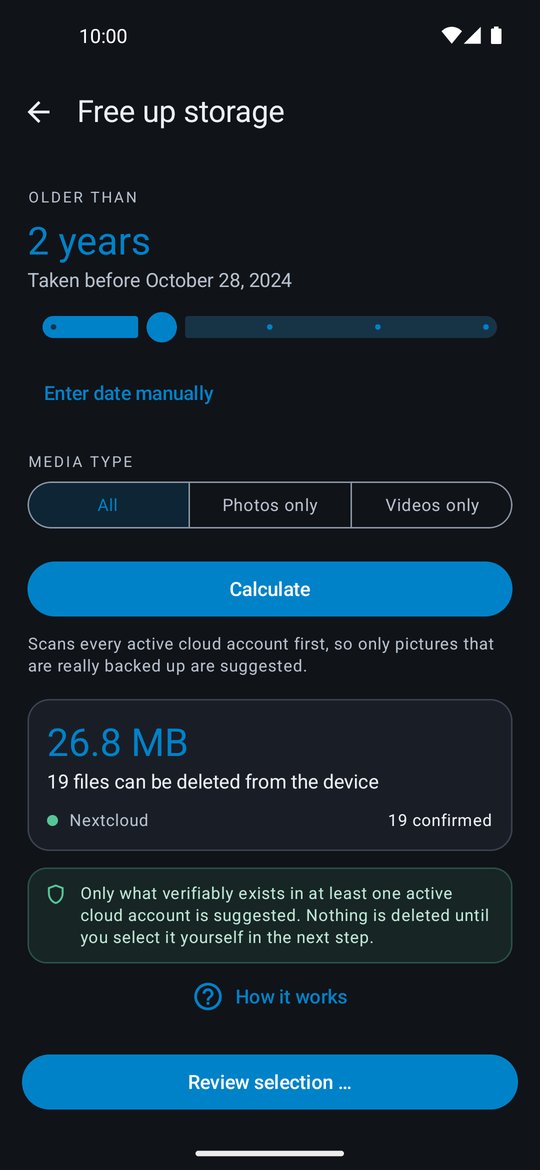
Next Gallery shows you exactly what is safely in the cloud. Only that is suggested – and nothing is deleted until you have reviewed the selection yourself. The pictures stay visible in the gallery.

Storage overview: what is on the device and how much can be freed
Free up space: pictures confirmed in the cloud can be deleted locally
Catch-up

Nothing gets left behind.

Not sure all your photos really made it to the cloud?

Next Gallery compares what is on your phone with what has really arrived in your cloud – and uploads whatever is missing, automatically. Already in the free version, for the photos of the last 3 years.

  • An upload got stuck
  • A photo was forgotten in the queue
  • A photo was deleted in the cloud but is still on your phone
Cloud page catching up: open pictures are being uploaded
Memories

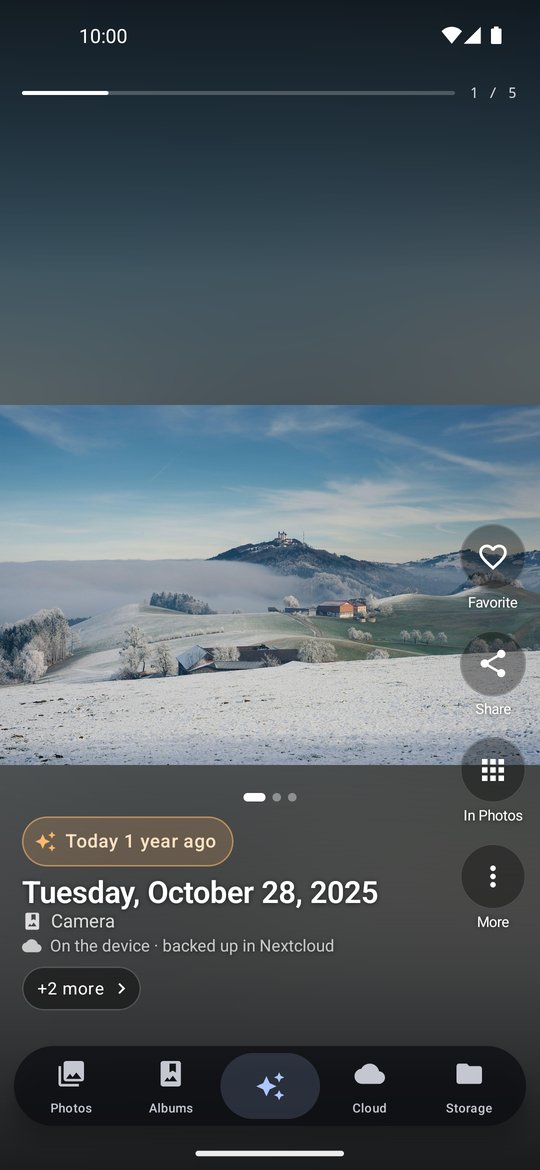
On this day, a year ago.

Every day, a reel of the photos and videos you took on this day in past years – picked from everything backed up in your cloud.

  • Each card shows a moment; “+N more” pages through the rest of that day
  • Rather not see a moment again? Hide it under “More”
  • Can be the start tab – the app then opens with the reel
Memories: a card “1 year ago today” with a photo from the same day last year
01

Local or cloud – it doesn't matter

View, share, download, delete: cloud photos work just like local ones.

02

Just photos. Nothing else.

No feed, no subscription – a fast gallery that handles large libraries, too.

PRO

Several clouds. One gallery.

Back up your photos to several clouds in parallel – or simply bring your other cloud accounts seamlessly into the gallery. Several accounts? No problem.

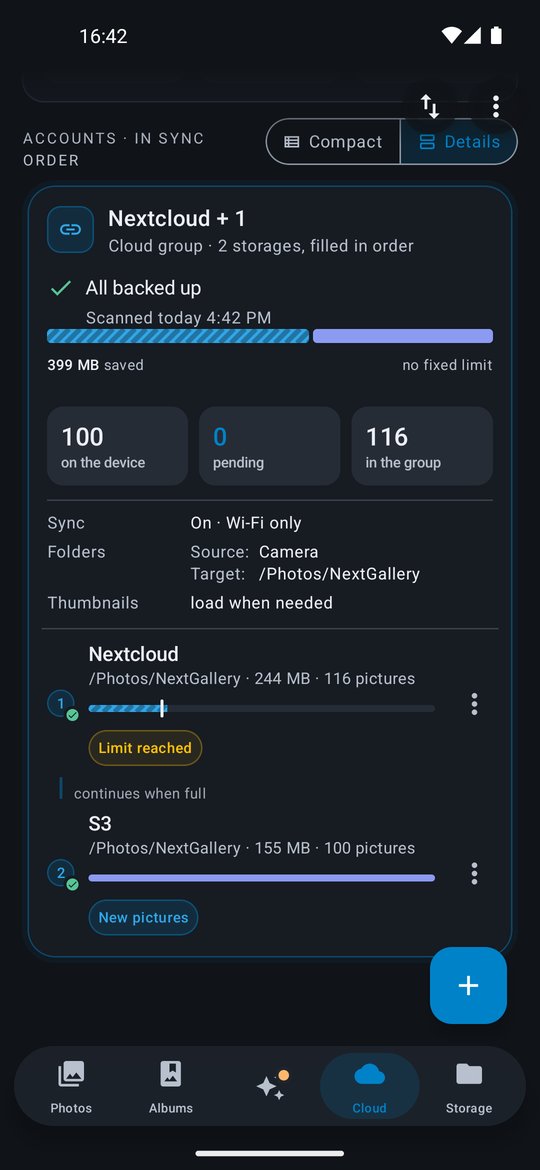
Or link them together: when one storage is full, the next takes over – in the order you choose, with a limit of its own for each account.

NextcloudOneDriveGoogle DriveS3WebDAV – coming soon
A cloud group of Nextcloud and S3: Nextcloud has reached its limit, S3 takes the new pictures

Free – or Pro, once.

Free

Forever, without ads
  • Unlimited photos on your phone
  • One cloud account: Nextcloud, OneDrive, Google Drive or S3
  • Load originals, catch up and free up space for the last 3 years
  • Everything in Pro for one month to try it out

Next Gallery Pro PRO

Buy once, no subscription
  • All years, no limit
  • Several cloud accounts, backed up in parallel if you like
  • Link clouds together: when one is full, the next takes over
  • New providers as they arrive

Frequently asked questions

Which clouds are supported?

Nextcloud (your own or a hosted instance), Microsoft OneDrive, Google Drive and S3-compatible storage such as AWS and others. WebDAV is in the works.

What does “Nextcloud seamlessly integrated” mean?

Photos from your Nextcloud appear in the same grid as the photos on your phone, sorted by date – backed-up pictures carry a cloud check mark. You open, share, download and delete them like local pictures, without switching to another app. Thumbnails come from your own server; the original is only loaded when you need it.

Which Nextcloud version do I need?

Nextcloud 20 or newer – sign-in uses Login Flow v2 and uploads use chunking v2, both available since version 20. We recommend Nextcloud 28 or newer: from there, the server reports each photo’s capture date with the folder listing, so a picture lands at the right date in the grid right away. Next Gallery is tested against Nextcloud 29 and 35.

Why do thumbnails load slowly the first time?

It depends on the storage. Nextcloud renders thumbnails on your server: the first time a picture is shown, the server has to open the original and scale it down, which can take a second or more per picture on a small server. After that it keeps the thumbnail, and Next Gallery keeps its own copy too – the second time is fast. The Nextcloud app “Preview Generator” can create them in advance. OneDrive delivers ready-made thumbnails from Microsoft and is usually quick. S3 storage cannot make thumbnails at all: Next Gallery downloads the original (up to 40 MB) and scales it down on the phone, so a large library over a slow connection takes a while. In every case thumbnails are loaded only once; under Settings you choose their size and how many load at the same time.

Why don’t my videos show a thumbnail?

Videos on your phone always have one. For a video that is only in the cloud, it comes from the storage: Nextcloud makes video thumbnails only with ffmpeg on the server and the preview provider OC\Preview\Movie switched on – out of the box it is off. OneDrive and Google Drive sometimes need a while after the upload, S3 makes none. How to set up your Nextcloud is in the help.

Why does a picture first appear at its upload date?

The grid sorts by capture date, which is stored inside the photo (EXIF). Nextcloud reads it when a photo comes in through Nextcloud and sends it with the folder listing. Photos that reach the storage another way – written straight into an external storage connected to Nextcloud, or kept on S3, which never reports a capture date – arrive without it, so at first they are sorted by the file’s date, often the day of the upload. Next Gallery then reads the capture date from the beginning of each such photo in the background, shortly after the first check, and moves the picture to its real date; nothing needs to be opened by hand. On Nextcloud it also helps to run the background jobs regularly (Administration › Basic settings › Background jobs: “Cron”).

Do I also need the Nextcloud app?

Not necessarily – but we recommend it. The official Nextcloud app is the all-rounder for all your files, and many people already use it for automatic photo upload. Next Gallery sees itself as a companion to it: a gallery where photos from your phone and from the cloud come together. If you like, Next Gallery can also take care of your photo backup entirely on its own. The two get along: if you choose the same target folder in Next Gallery as the Nextcloud app uses for automatic upload, Next Gallery recognises the photos already backed up there and does not upload them again. How you organise your photo backup is up to you.

Where do my photos go?

Only to the storage you connect yourself. Next Gallery runs no cloud of its own, sells no storage and never gets to see your photos.

Does the app delete anything without asking me?

No. "Free up space" only suggests pictures that are verifiably present in at least one active cloud account. Nothing is deleted until you select it yourself in the next step.

What happens after the trial month?

The app stays free to use. Pro features – several accounts, pictures older than 3 years – pause until you buy Pro. Nothing is deleted.

Does the app store my password?

No. You sign in to Nextcloud and OneDrive in the browser, with the provider itself; Next Gallery only gets a key of its own for it (an app password or a token), which you can revoke in your Nextcloud or Microsoft account at any time. Google Drive you allow through Google Play services; the app never gets your Google password. Only for S3 do you enter an access key and secret key yourself. All of it is kept encrypted in the Android Keystore on your device and is only ever sent to your own storage – never to us.

Do I need an account with you?

No. There is no account, no sign-in with us and no analysis of how you use the app.

Is Next Gallery the official gallery app for Nextcloud?

No. Next Gallery sees itself as a companion to the applications around the Nextcloud universe; it is an independent product.
Support

Found a bug? Got an idea?

Write to us – easiest straight from the app under Settings › Help & feedback. Version and device are filled in for you then.

support (at) nextgallery.app

What makes a good bug report:

  1. What you did
  2. What you expected – and what happened instead
  3. Which cloud provider (Nextcloud, OneDrive, Google Drive, S3)
  4. App version and Android version